
What is NeoSME Professional / Ultimate?
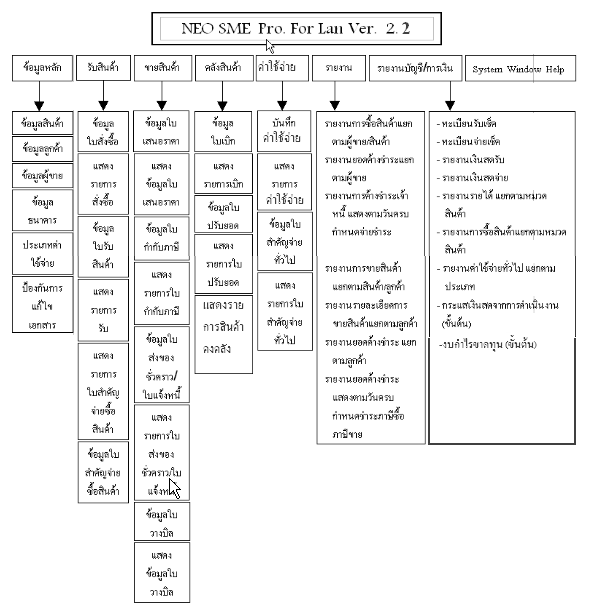
Explore editions covering master data, purchasing, sales, inventory, expenses and accounting and financial reports.
Master data
Search product, customer and supplier records by part of a name or code. Maintain product and service information with selling prices and costs.
Maintain bank and expense-category records, print cheques and close accounting periods to protect documents.
Purchasing and payables
Prepare purchase orders, receive goods and search purchasing records by document, supplier, product or period.
Record purchase payment vouchers, review payables and record payments in cash or by cheque.
Sales and receivables
Prepare and search quotations.
Prepare tax invoices and receipts, with discounts entered as a percentage or an amount and an assigned salesperson.
Create temporary delivery notes and convert them to tax invoices later. Calculate tax and discounts automatically.
Find invoices by document number, customer, product or date range.
Record stock issues for other uses, prepare billing notes, review receivables and receive cash or cheques.
Inventory
Record issues and search stock by partial product code, name or description.
Adjust inventory balances and review adjustment details. Track past and current movements with stock cards.
Review the sources and destinations of goods, inventory quantities and valuation for a selected date. Export data to Excel.
Expenses
Record expense date, payee, category and bill number. Review payment dates, due dates and bank-account details.
Print cheques, pay-in slips and expense reports, with expenses linked automatically to input VAT.
Financial reporting
Review cheque receipts and payments, cash books, sales reports, cash flow and preliminary profit and loss reports.
General functions
Manage passwords and database backups. Set company details, logo and address in Thai and English.
Review transaction history and customise report layouts. Print using dot-matrix, inkjet, laser or network printers.
Record stock movements in real time, review purchasing and sales history and export data to Excel. The product documentation lists more than 45 reports. Manuals, training and ongoing support are available.
Application screens and documents
Common questions
What does NeoSME Professional / Ultimate manage?
Explore editions covering master data, purchasing, sales, inventory, expenses and accounting and financial reports.